


McDonald's
4.0414.77K Reviews
App Specs
- Version
- 26.72.5
- Updated On
- License
- Free
- Downloads
- 50,000,000+
- Developer
- McDonalds USA, LLC
- Categories
- Food & Drink
- Platform
- Android, iOS
Screenshots
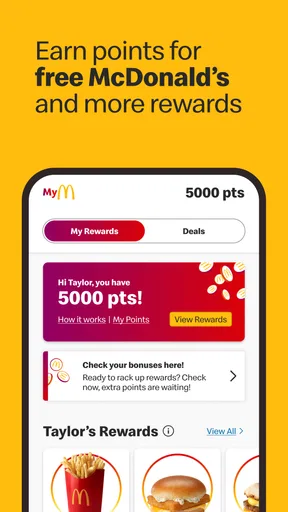
 Analysis by AppCompare
Have you ever found yourself in the middle of a craving for some fast food goodness but didn’t want to leave the comfort of your home? Well, welcome to the world of the McDonald's app, your one-stop solution for satisfying those Big Mac desires without stepping out.
A practical tool, not a reason to order
I see this as a useful companion for people who already choose McDonald’s now and then, rather than an app that makes the food itself a better fit for everyone. Its main appeal is putting menu browsing, ordering, deals, and rewards in one place. That can make a familiar stop feel more organized, especially when I know what I want before reaching the counter. It is less compelling if I rarely eat there, prefer comparing several restaurants, or simply want to decide face to face.
The app is a free Food & Drink app from McDonalds USA, LLC. Its scale is notable: it has an average rating of 4.2 from around 2.2 million ratings and more than 50 million installs. Those figures suggest plenty of people use it, but they don’t guarantee that every local ordering experience will be equally smooth. Restaurant availability, the order options shown, and the usefulness of offers can depend on where you are, so I’d treat the app as a convenient route to a nearby McDonald’s rather than a universal substitute for every way of ordering.
Guides and Analysis on McDonald's
Getting Started with McDonald's App
So, you’ve just downloaded the McDonald's app. First impressions are everything, right? Opening the app, you’re greeted with a sleek and intuitive interface that doesn’t leave you guessing where to tap next. The navigation is smooth, and finding what you need is as easy as pie, or should I say, a McDonald's apple pie.
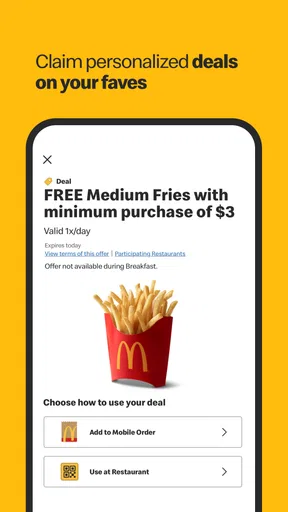
Once you’re in, you’ll notice the app is pretty much like a digital menu board at a McDonald's outlet. Everything is well-categorized, from burgers to beverages and those mouth-watering desserts. And, if you’re a fan of deals (who isn’t?), the app doesn’t disappoint. It’s packed with exclusive offers that can make your meal a whole lot cheaper.
Order with Ease
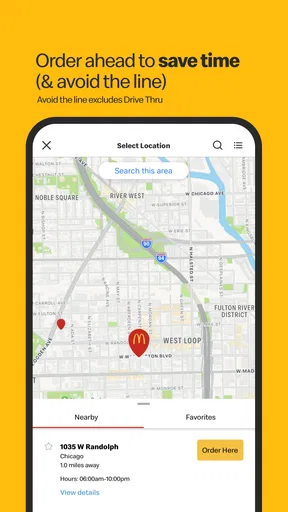
One of the coolest features is the ordering process. You can customize your order just like you would at the counter. Want extra pickles on your cheeseburger? No problem. The app lets you add, remove, or tweak your meal to your heart’s content. Plus, the location-based services ensure you’re ordering from the nearest outlet, so your food arrives hot and fresh.
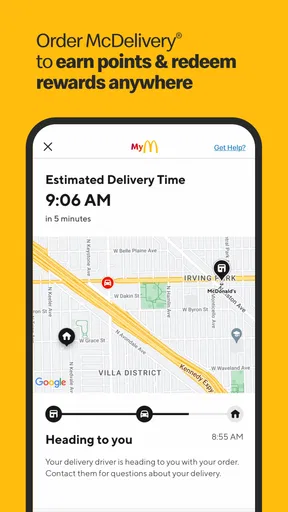
The payment options are as diverse as the menu. You can choose to pay through the app or upon delivery. It’s all about convenience here, folks. And if you’re wondering about the wait time, the app gives you real-time updates about your order status. No more guessing games!
Worth Reading Before You Choose

Baby Panda World Brings Quick Play to Modern Phones, but Its Game Library Feels Busy

ESPN’s Live Game View Makes Following Close Games Easier

QuizzLand Review: A Good Fit for Short Trivia Breaks, Not Every Player

Basketball Stars: Multiplayer Is Fast, but Can It Recover When Matches Go Wrong?

WEBTOON Turns Phone Updates Into a Better Reading Routine

Link to Windows Runs on Shared Habits, Not Social Feeds
Choosing the right ordering moment
A useful way to work the app into a busy day is to browse before you are hungry enough to rush. I can check the menu and adjust a familiar order while I have a moment, then make the final choice when I know whether I’m picking up or arranging delivery. That small pause is valuable: it gives me a chance to review the meal and its modifications instead of trying to explain everything quickly at a counter.
For a realistic lunch break, imagine I have only a short window and already know which nearby restaurant I can reach. I can look over the available choices, check whether an offer suits what I intended to buy, and place an order if the app presents the option I need. If the restaurant is busy, or the app’s displayed choices do not match my plans, I would rather switch to ordering in person than assume that a digital order guarantees a faster handoff. The app helps with preparation; it cannot make a crowded restaurant or an unsuitable pickup plan disappear.
Customization is most useful when I keep it deliberate. I would review each change before placing the order, particularly when ordering for someone else, because a quick tap can alter a familiar item in a way that is easy to overlook. For a group, I find it clearer to build and check each person’s food separately than to rush through a complicated shared order. That is a practical advantage over placing an order verbally when several people are calling out changes, but it still depends on carefully checking the final cart.
It is also worth thinking about the difference between selecting the nearest location and choosing the most convenient one. The closest restaurant may not be the best choice if I am already travelling in another direction or if I need an ordering method that the selected location does not offer at that moment. I would confirm the location and handoff plan before paying. That simple check matters more than assuming that location-based ordering will automatically choose the right outlet for every trip.
Where the convenience has limits
The app is not a complete replacement for a restaurant visit. A digital menu is helpful for browsing, but people who want to ask questions before deciding may find a conversation at the counter more comfortable. Similarly, customization can make an order more personal, yet it does not remove the need to double-check what is in the basket. I would not rely on an app to resolve an unclear request without reviewing the available choices and the order summary.
There is also a trade-off in making deals central to the decision. An offer is only useful if it fits what I actually want and is available for the order I am placing. I try not to add food just to make a promotion feel worthwhile; otherwise, the supposed saving can lead me away from a sensible order. When I already planned to visit McDonald’s, checking the deals is a helpful extra. When I am choosing between restaurants, I would compare the whole meal and convenience, not just the presence of a coupon.
Compared with third-party delivery apps, the McDonald’s app is the more direct place to start when I want to browse McDonald’s items, consider its offers, or use its rewards. A broader delivery service can be more useful when I am deciding among several restaurants or coordinating food from different places. Ordering at the counter remains the straightforward alternative when I want to ask a question, change my mind while ordering, or avoid doing everything on a phone. Each route solves a different problem; the McDonald’s app is strongest when I already know the restaurant is the one I want.
Readers often want to know whether they need to pay in the app, whether they can alter an item, and whether the app makes delivery or pickup possible. The ordering flow supports customization, and the available payment and fulfilment choices are presented as part of placing an order. I would check the choices shown for the selected restaurant rather than assume that every option appears in every situation. For someone who only wants to browse, the menu and deals can still help with planning, but the app’s biggest benefit arrives when its ordering and rewards features match the way that person already buys food.
Perks and Rewards
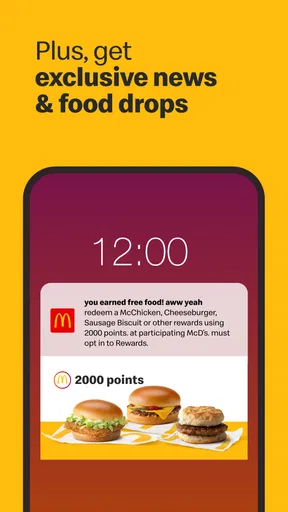
Who doesn’t love a little reward for their loyalty? The McDonald's app offers a loyalty program where every purchase earns you points. Accumulate enough points, and you can redeem them for free items. It’s like getting a little pat on the back for being a regular.
Moreover, the app sends personalized notifications about new promotions and menu items, so you’re always in the loop. It's like having a personal McDonald's assistant who keeps you updated about everything delicious.
Rewards work best for me when I treat them as a bonus on purchases I would make anyway. If I visit occasionally, I can still appreciate a deal, but a loyalty program naturally matters more to someone who returns often enough to use it. Before counting on a reward for a particular meal, I would check what the app currently shows and whether the offer suits the order I am building. That keeps the decision grounded in what is actually useful, rather than an assumption that every purchase will immediately lead to a meaningful free item.
Notifications can be handy if I want to hear about promotions, but they are not essential to placing an order. I would keep them only if the reminders feel useful; otherwise, I can open the app when I am already considering a visit. That is a small but worthwhile distinction for anyone who prefers fewer interruptions. A deal-focused user may like being alerted, while someone who orders only now and then can simply check the app at the point of decision.
For families or friends ordering together, the rewards angle should not distract from making sure the food itself is right for each person. I would settle the group’s choices first, review the customizations, and then see whether an offer or reward fits. This order of operations makes the app more useful: it keeps the meal plan in charge, with discounts and points as a secondary benefit rather than the reason for adding items nobody wanted.
Who will get the most from it
I would recommend the app most readily to regular McDonald’s customers who like to check the menu in advance, customize familiar items, and keep deals or rewards close at hand. It is also a sensible option for someone who wants to order without holding up a group conversation at the counter: each person can decide first, and the person placing the order can review the choices in one place. The app’s Everyone content rating makes it broadly suitable to browse, though children should still have an adult handle payments and ordering decisions.
On the other hand, I would skip it if McDonald’s is an occasional choice and installing another app feels like more effort than using the counter. It is not the best starting point for someone who wants to compare a whole neighborhood of restaurants, and it may not suit a customer who prefers to speak directly with staff before settling on a meal. People with an older phone should also check compatibility: the current version is 25.104.1 and requires iOS or Android 9 or later. The app first appeared on October 24, 2014, and its long presence has given it a familiar role, but the practical question is whether its current ordering and rewards tools fit your routine.
As an app, it does not change what McDonald’s sells or make every visit effortless. What it can do is move some of the browsing and decision-making out of the queue, make it easier to inspect a customized order, and give regular customers a place to check offers and points. I value that combination most when I already have a clear plan and want to carry it out with fewer back-and-forth steps.
Final Thoughts
All in all, the McDonald's app is a game-changer for fast food lovers. It brings the entire McDonald's experience to your fingertips, from ordering to payment, with the added bonus of exclusive deals and rewards. Whether you're ordering a quick lunch or planning a family feast, this app has got you covered. So, next time you’re craving some fries, why not give the app a whirl? Trust me, your taste buds will thank you!
My recommendation is a little more specific: try it if McDonald’s is already part of your routine and you want an easier way to check the menu, shape an order, or keep track of perks. I would not install it expecting every restaurant visit to become faster or every promotion to suit me. With a 4.2 average across hundreds of thousands of written reviews, it is clearly a well-used option, but the best test is whether its particular mix of ordering and rewards saves you effort in your own day. For the right customer, it is a handy shortcut; for everyone else, the counter or a broader restaurant app may be the simpler choice.
Pros
- User-friendly interface for easy navigation.
- Frequent updates with new features.
- Exclusive deals and discounts available.
- Order tracking for real-time updates.
- Customizable order options.
Cons
- Occasional app crashes reported.
- Limited payment methods available.
- Requires constant internet connection.
- Notifications can be overwhelming.
- Some features unavailable in certain regions.
FAQs for McDonald's
What features does the McDonald's app offer?
The McDonald's app provides a range of features including mobile ordering, exclusive deals, and a restaurant locator. Users can customize their orders, save favorite meals, and utilize the seamless payment options. Additionally, the app offers nutritional information and a rewards program that allows users to earn points for free food.
How does the mobile ordering process work?
Mobile ordering through the McDonald's app is straightforward. Users can browse the menu, customize their selections, and place an order directly from their device. Once the order is confirmed, users can choose between pickup or curbside delivery. Payment is completed through the app for a quick and contactless experience.
Are there any exclusive deals or offers available on the app?
Yes, the McDonald's app frequently features exclusive deals and offers that are not available in-store. These can include discounts on popular menu items, buy-one-get-one-free promotions, and special limited-time offers. Regular users can benefit significantly by checking the app’s deals section before ordering.
Is the McDonald's app available for both Android and iOS devices?
The McDonald's app is available for both Android and iOS devices. Users can download it for free from the Google Play Store or the Apple App Store. The app is optimized for both platforms, ensuring a seamless user experience across different devices and operating systems.
Does the app support multiple payment methods?
Yes, the McDonald's app supports multiple payment methods for user convenience. It allows for credit and debit card payments, as well as integration with digital wallets like Apple Pay and Google Pay. This variety ensures that users can choose the payment method that best suits their needs.


